
How do I create a redirect?

    1. Login to cPanel.
    2. Locate and click on the "Redirects" icon under the "Domains" category.
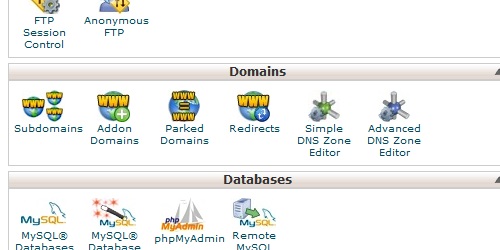
Open the Redirects page in cPanel.
    1. Enter the URL you want to redirect from, and then the URL you want to redirect to.
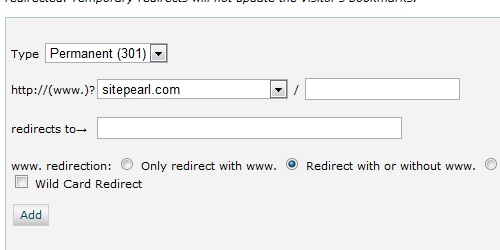
Enter the required information for the redirect.
  1. Click on the "Add" button to create the redirect.
  • 53 gebruikers vonden dit artikel nuttig
Was dit antwoord nuttig?

Gerelateerde artikelen

How do I find my MySQL version?

Login to cPanel In the "Stats" section on the left, locate the row labeled "MySQL Version"....

How do I access cPanel?

cPanel can be accessed by using either of the URLs below:   www.yourdomain.com/cpanel...

How do I create a subdomain?

Login to cPanel. Locate and click on the "Subdomains" icon under the "Domains" category....

How do I create an addon domain?

Login to cPanel. Locate and click on the "Addon Domains" icon under the "Domains" category....

What is a parked domain?

A parked domain is a domain that simply redirects users to a different domain. For instance, if...

Powered by WHMCompleteSolution