
How do I create a redirect?

    1. Login to cPanel.
    2. Locate and click on the "Redirects" icon under the "Domains" category.
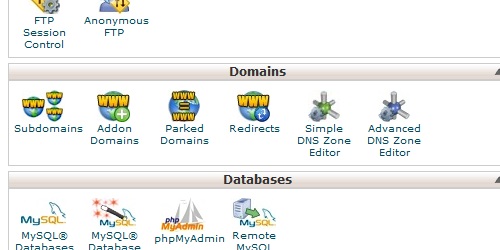
Open the Redirects page in cPanel.
    1. Enter the URL you want to redirect from, and then the URL you want to redirect to.
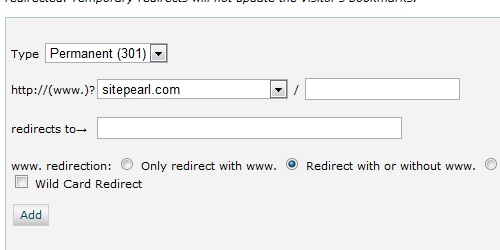
Enter the required information for the redirect.
  1. Click on the "Add" button to create the redirect.
  • 53 användare blev hjälpta av detta svar
Hjälpte svaret dig?

Relaterade artiklar

What do my cPanel stats mean?

Within cPanel, there are numerous statistics listed on the left of the screen.   Main Domain...

What is a redirect?

A domain redirect is an instance where a visitor is redirected to a different page when they try...

How do I find my PHP version?

Login to cPanel. In the "Stats" section on the right, located the row labeled "PHP version"....

How do I create an addon domain?

Login to cPanel. Locate and click on the "Addon Domains" icon under the "Domains" category....

How do I access cPanel?

cPanel can be accessed by using either of the URLs below:   www.yourdomain.com/cpanel...

Powered by WHMCompleteSolution