
How do I create a parked domain?

    1. Login to cPanel.
    2. Locate and click on the "Parked Domains" icon in the "Domains" category.
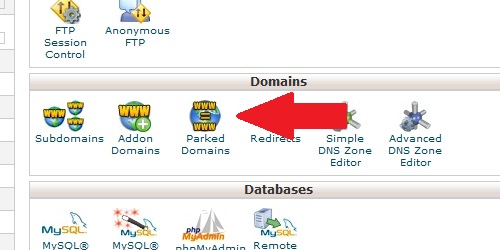
Open the Parked Domains page from within cPanel
    1. Enter the domain name you wish to park.
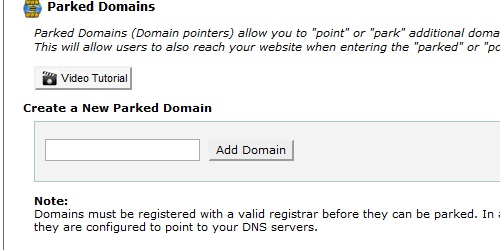
Enter the name of the domain you wish to park.
  1. Click on the "Add Domain" button.

Note: This will only work if the parked domain's DNS servers are set to the same as the master domain's.

  • 51 Los Usuarios han Encontrado Esto Útil
¿Fue útil la respuesta?

Artículos Relacionados

What do my cPanel stats mean?

Within cPanel, there are numerous statistics listed on the left of the screen.   Main Domain...

What is a parked domain?

A parked domain is a domain that simply redirects users to a different domain. For instance, if...

How do I find my MySQL version?

Login to cPanel In the "Stats" section on the left, locate the row labeled "MySQL Version"....

How do I create a redirect?

Login to cPanel. Locate and click on the "Redirects" icon under the "Domains" category....

How do I find my PHP version?

Login to cPanel. In the "Stats" section on the right, located the row labeled "PHP version"....

Powered by WHMCompleteSolution