
How do I create a redirect?

    1. Login to cPanel.
    2. Locate and click on the "Redirects" icon under the "Domains" category.
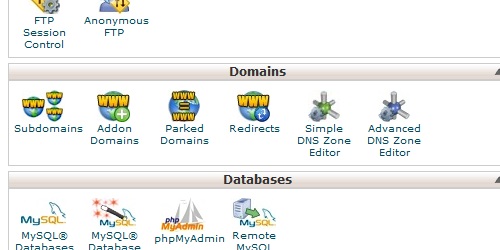
Open the Redirects page in cPanel.
    1. Enter the URL you want to redirect from, and then the URL you want to redirect to.
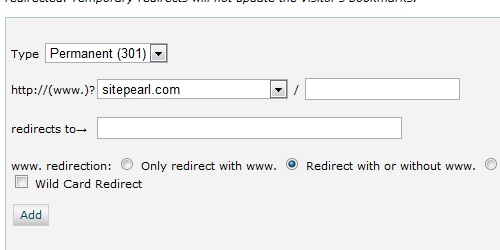
Enter the required information for the redirect.
  1. Click on the "Add" button to create the redirect.
  • 53 Usuários acharam útil
Esta resposta lhe foi útil?

Artigos Relacionados

What do my cPanel stats mean?

Within cPanel, there are numerous statistics listed on the left of the screen.   Main Domain...

How do I create an addon domain?

Login to cPanel. Locate and click on the "Addon Domains" icon under the "Domains" category....

What is a subdomain?

A subdomain is a subsection of a main domain, in this format: subdomain.maindomain.com...

How do I access cPanel?

cPanel can be accessed by using either of the URLs below:   www.yourdomain.com/cpanel...

What is an addon domain?

An addon domain is a domain that can be added to an existing hosting account and exist as its own...

Powered by WHMCompleteSolution