
How do I create a parked domain?

    1. Login to cPanel.
    2. Locate and click on the "Parked Domains" icon in the "Domains" category.
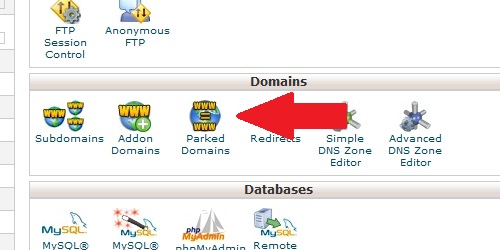
Open the Parked Domains page from within cPanel
    1. Enter the domain name you wish to park.
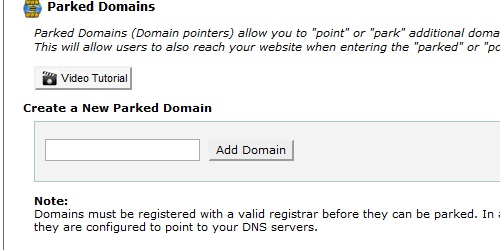
Enter the name of the domain you wish to park.
  1. Click on the "Add Domain" button.

Note: This will only work if the parked domain's DNS servers are set to the same as the master domain's.

  • 51 Користувачі, які знайшли це корисним
Ця відповідь Вам допомогла?

Схожі статті

What do my cPanel stats mean?

Within cPanel, there are numerous statistics listed on the left of the screen.   Main Domain...

What is a subdomain?

A subdomain is a subsection of a main domain, in this format: subdomain.maindomain.com...

How do I find my MySQL version?

Login to cPanel In the "Stats" section on the left, locate the row labeled "MySQL Version"....

What is a redirect?

A domain redirect is an instance where a visitor is redirected to a different page when they try...

What is an addon domain?

An addon domain is a domain that can be added to an existing hosting account and exist as its own...

Powered by WHMCompleteSolution